Every training session in one place

One log for the athlete and the coach. The athlete sees their own progress and knows what to work on. The coach has an overview of every session, including the ones they did not attend. Together they build the basis for analysis: from shared sessions on snow and dryland and from the athlete's individual preparation.

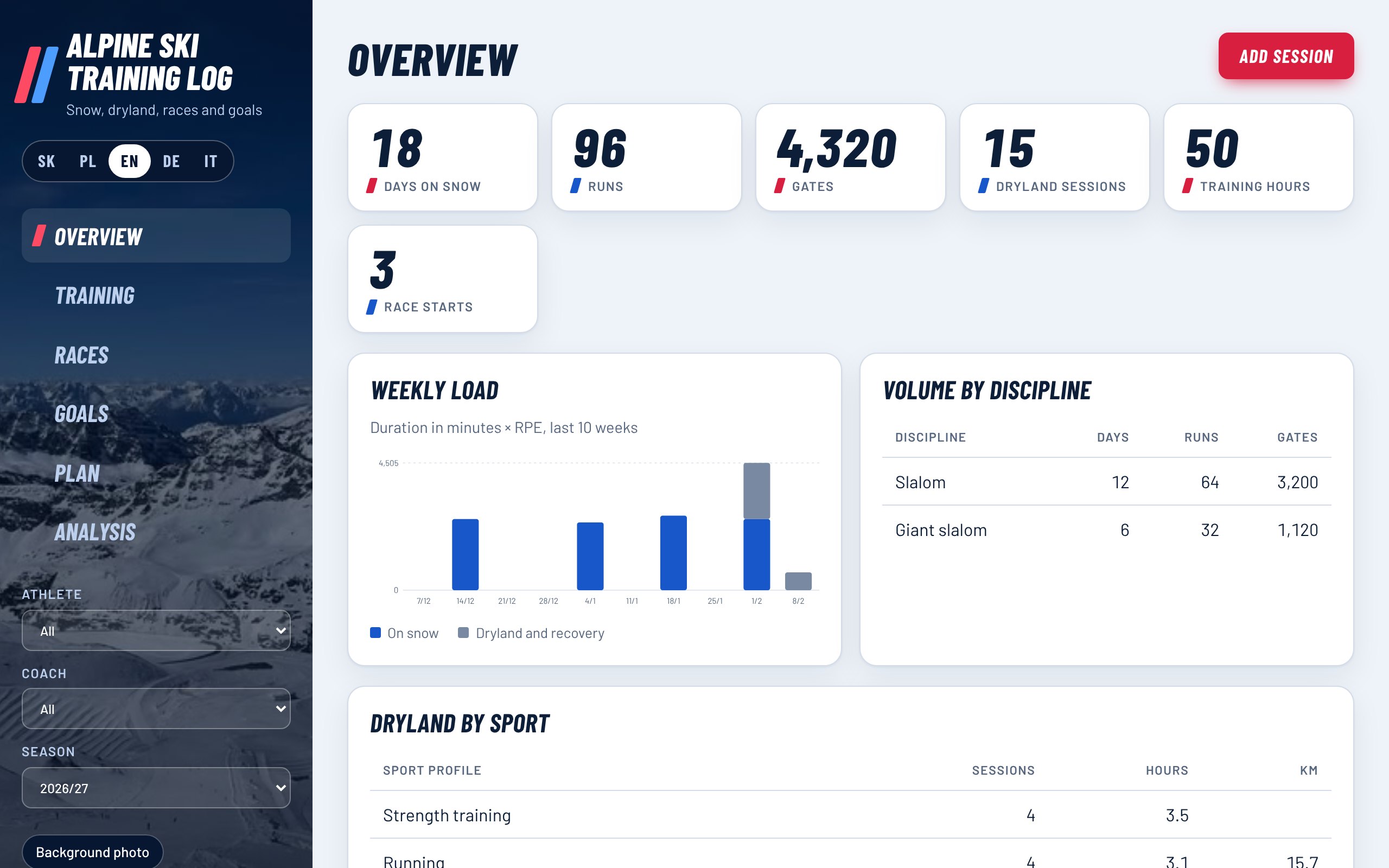
Season overview: days on snow, runs, gates, weekly load and volume by discipline

Who it is for

Athlete

Sees the plan from the coach and logs sessions, times, feeling and health. Follows their own progress between seasons.

Coach

Sets the plan, checks completion and compares athletes with each other. The coach gets an athlete's entries in the weekly or monthly report, or loads them from a backup file.

Plan from the coach

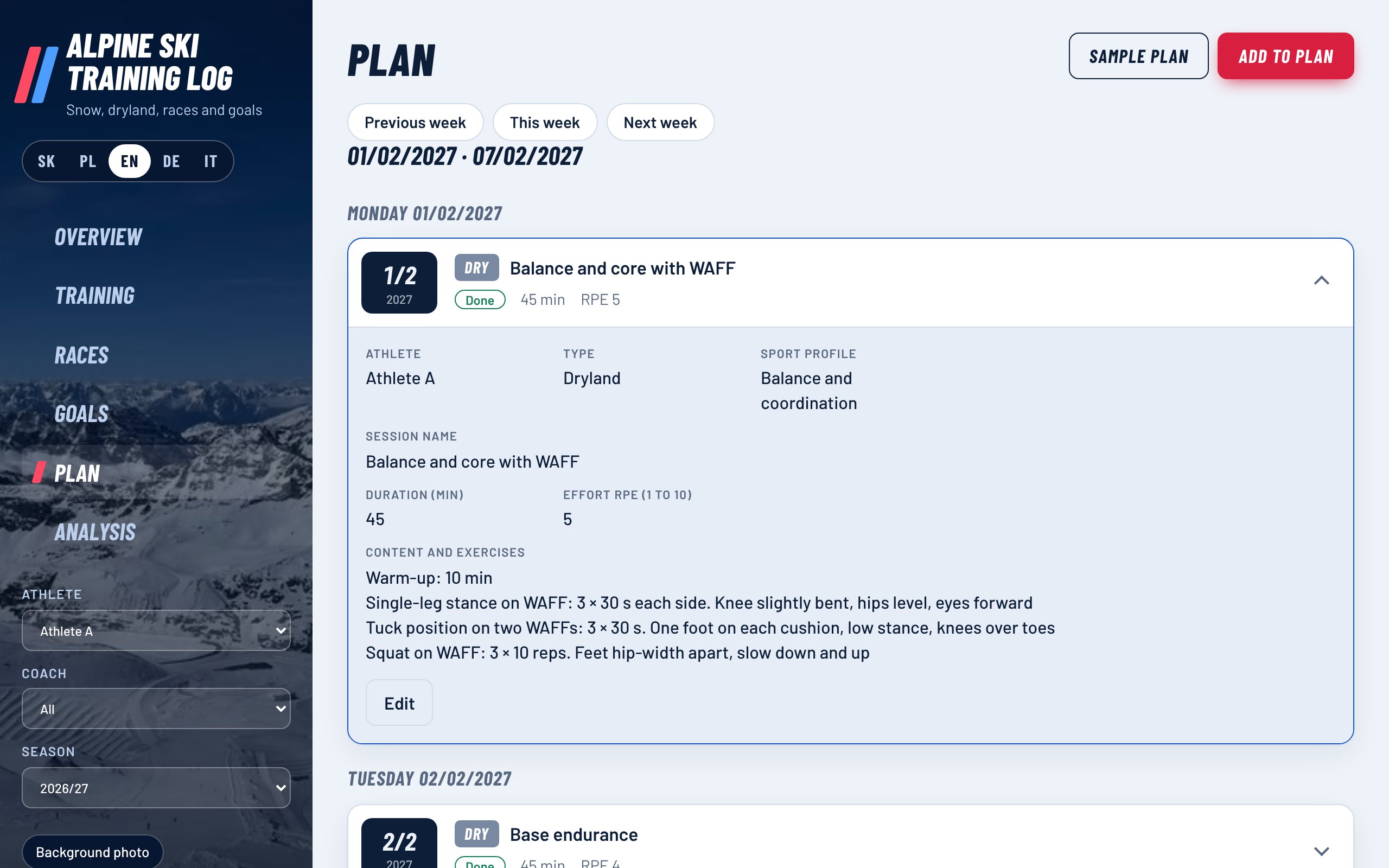
The coach plans sessions for each day and for each athlete separately. There are sample dryland plans in three fitness levels and an exercise library that includes exercises on WAFF cushions. A sample plan is a proposal that the coach adjusts to the athlete's age and health.

Each exercise has a schematic animation of the movement. The athlete logs a session as done with one click and adds how it went.

Weekly plan of an athlete with the completion status of each session
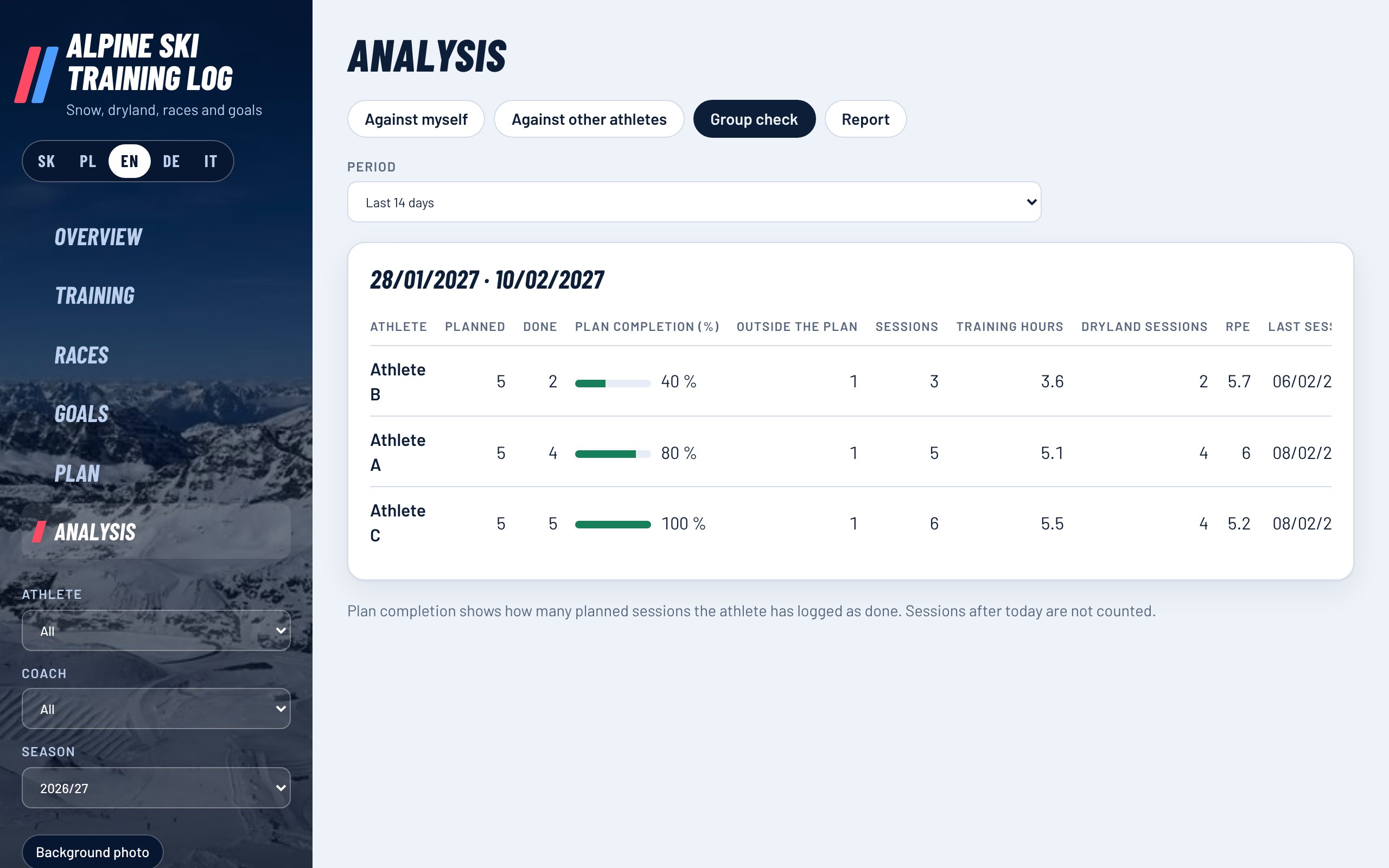
Group check: plan completion, number of sessions and days without training for each athlete

Discipline and diligence in one place

The group check shows, for the chosen period, how many planned sessions each athlete completed, how much they trained outside the plan, when they last trained and how many days they have gone without training. The athlete can also send the coach a weekly report with a summary of sessions and a personal note in one press.

What the log records

On-snow training

Discipline, runs, gates, run times with splits, unfinished runs, snow, weather, temperature, skis and edge preparation.

Timing system import

Times from CSV, TXT or Excel files. MyFreelap exports are recognised automatically, including split times.

Dryland and recovery

30 sport profiles, 16 recovery types, heart rate, zones, distance, ascent, power, sleep and HRV.

Watch import

Activities from FIT, TCX and GPX files exported by Garmin Connect, Polar Flow, Suunto, COROS and other apps.

Races and goals

Rank, run times, gap, points. Outcome, performance and process goals with progress in percent.

Analysis

Compare an athlete against a previous season or against other athletes. A statistics table and charts.

Printable reports

A results report per athlete or club. Print it, save it as PDF or download it as CSV.

Five languages

Slovak, Polish, English, German and Italian. On a phone it runs as an app on the home screen.
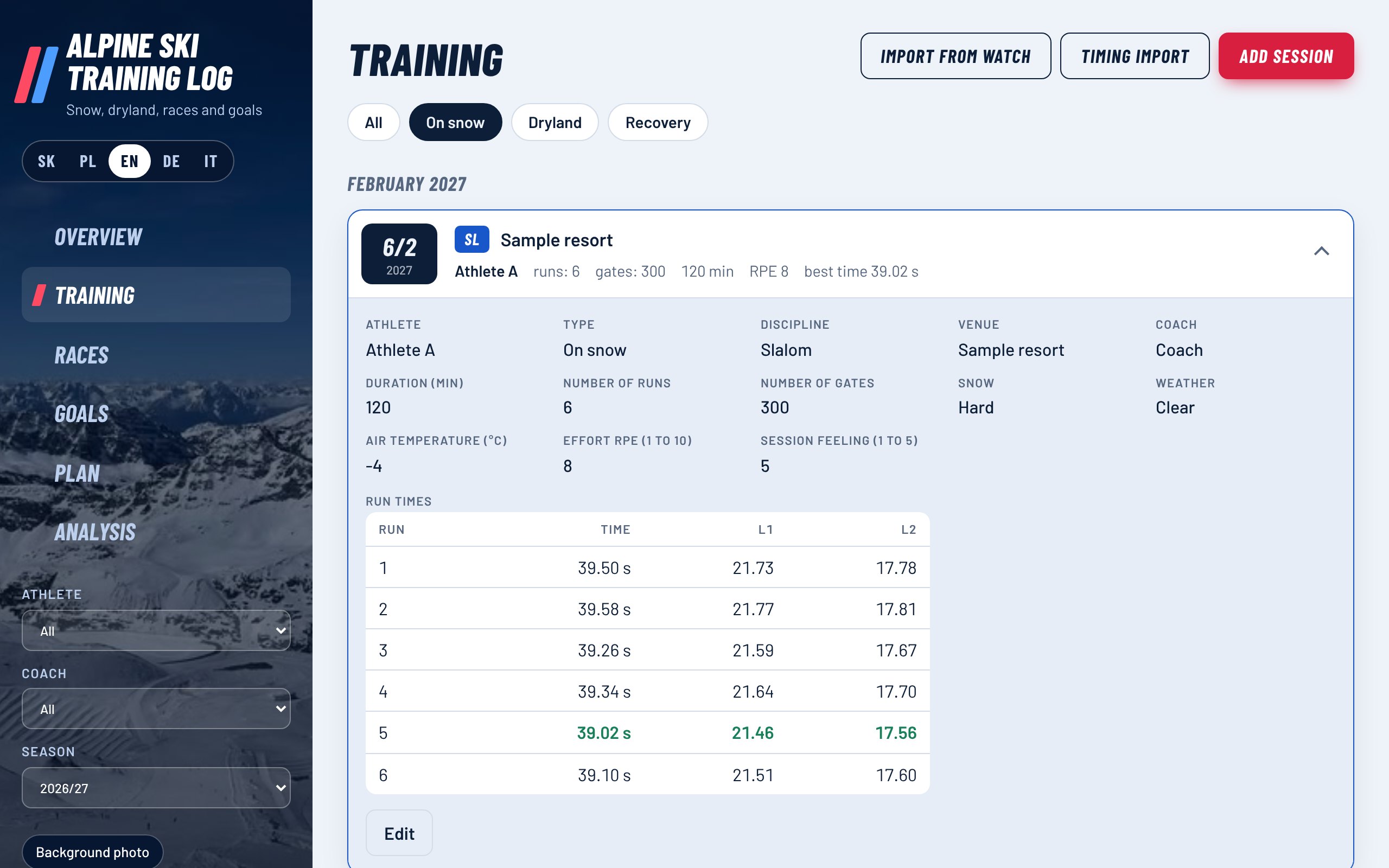
Every run with split times

Expanding a session shows all recorded data and a table of runs. The best total time and the best split are highlighted.

A comparison that makes sense

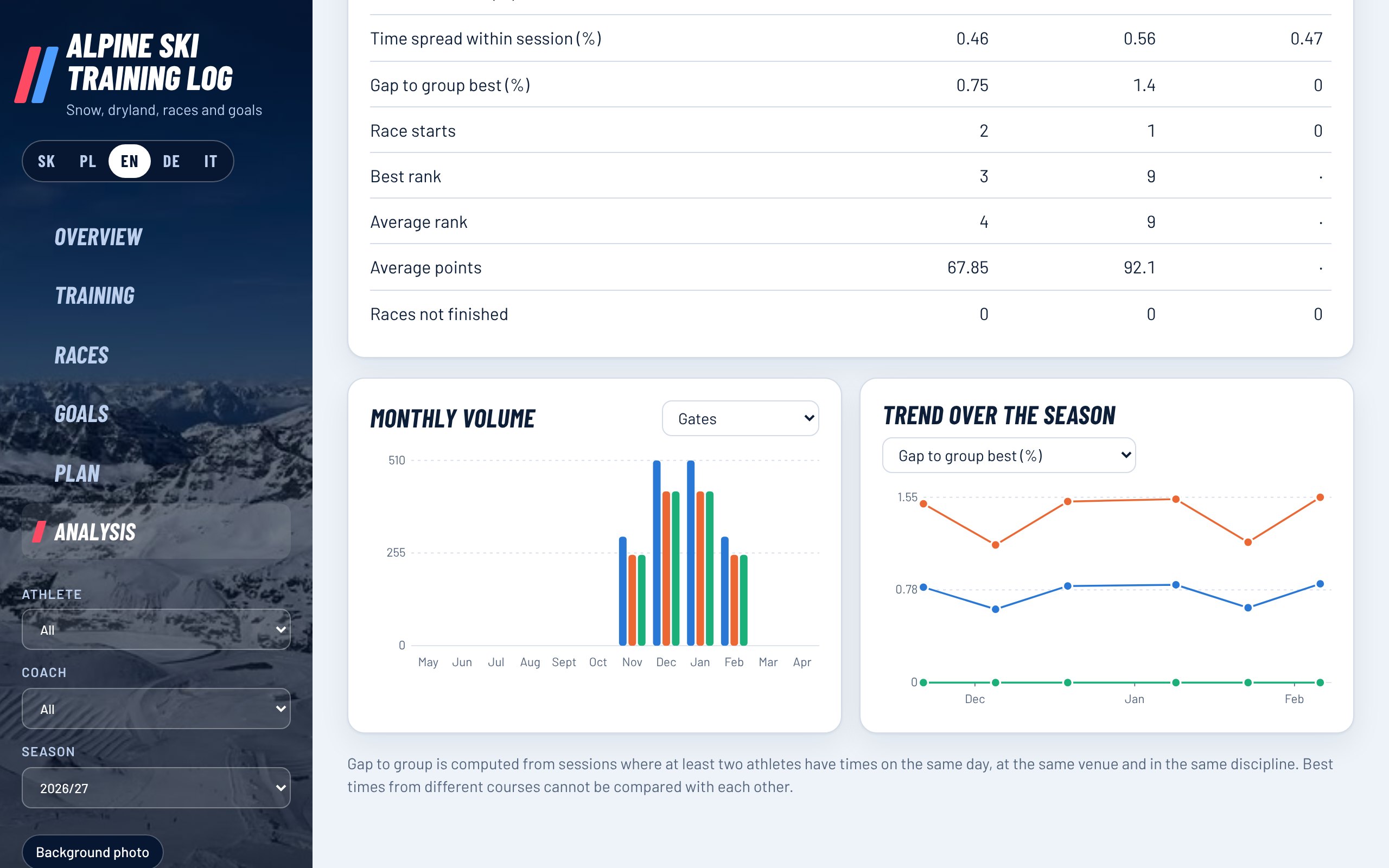
Times from different courses cannot be compared. The gap to the group best is therefore computed only from sessions where at least two athletes skied on the same day in the same discipline.

Expanded session with a table of runs and split timesAnalysis: three athletes compared in a table and charts

Price

Alpine Ski Training Log

x
  • For one athlete or coach
  • Data stays only on your device
  • No account and no server
  • Moves between devices through a backup file
Buy
Online payment:

Screenshots on this page show made-up sample data.

Where the data lives

Entries are stored only in the browser on your device. We have no access to them. You download a backup as a single file.

Frequently asked questions

Do I need to install anything?

No. The log runs in the browser on a computer and on a phone. You can add it to your phone home screen as an app.

How does the data get from the athlete to the coach?

The athlete sends the coach a weekly or monthly report by e-mail, WhatsApp, SMS or as a PDF. The whole log is handed over as a backup file, which the coach loads into their own log. The coach sends the plan to the athlete the same way. This version has no automatic sync between devices.

Does the log read watch data automatically?

No. You export the activity from the watch app as a FIT, TCX or GPX file and upload it to the log. You can upload several files at once. The log has no direct connection to watch makers' accounts.

Which timing systems are supported?

The log reads any export in CSV, TXT or Excel format where times sit in columns. You assign the columns by hand and the log remembers them. Automatic recognition has been checked on a MyFreelap export.

Are the sample plans a finished training programme?

No. They are proposed sessions with exercises and dosage in three levels. The coach always adjusts volume and intensity to the athlete's age, health and experience.

Can I return my purchase?

The withdrawal terms for digital content are in the terms of sale and licence (in Slovak). You can try the log in the demo before buying.